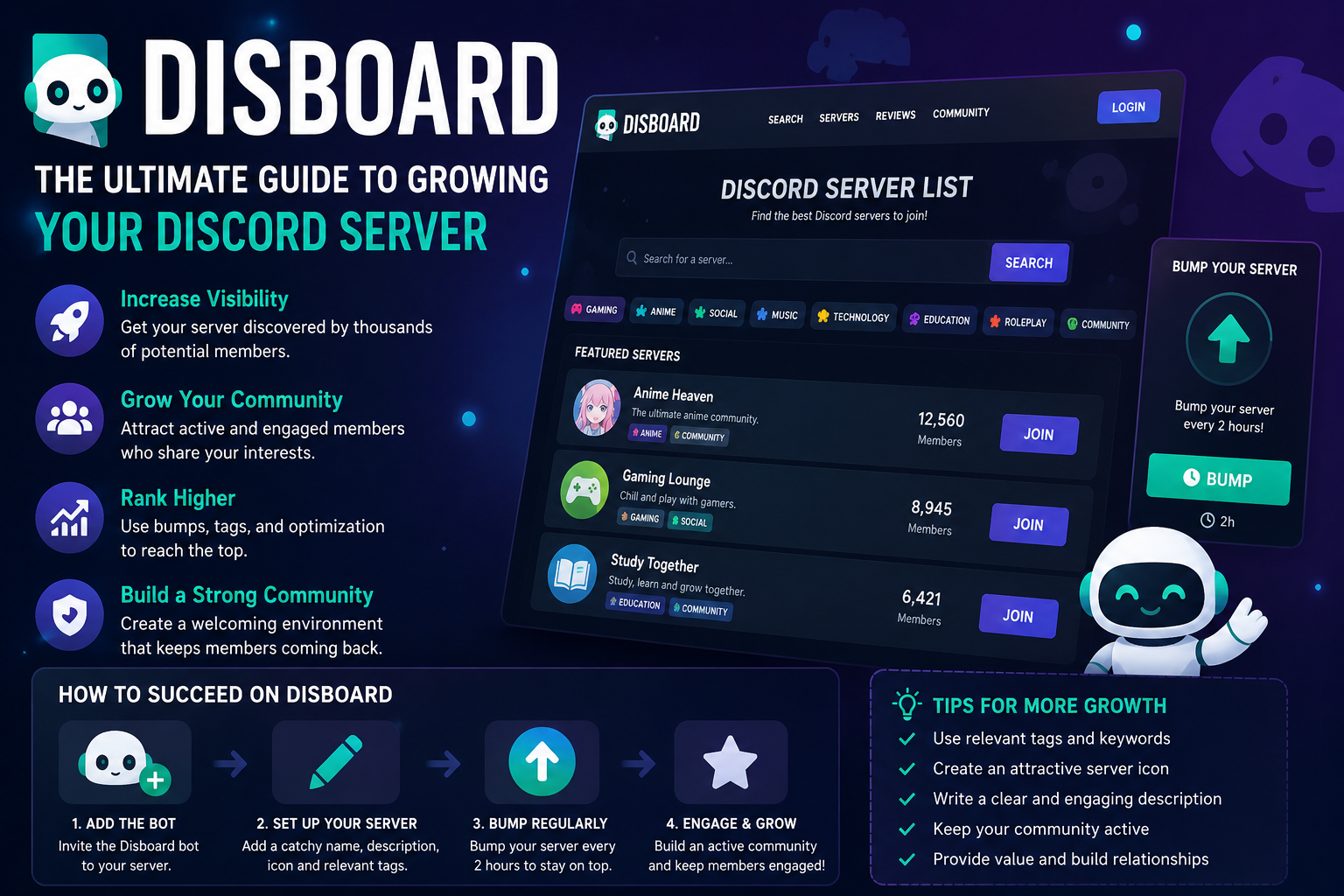
Discord has evolved from a niche communication platform for gamers into one of the largest online communities in the world. Today, millions of users rely on Discord for everything from gaming and education to networking, entertainment, and brand building. As the number of servers continues to grow, visibility has become a major challenge for server owners. This is where Disboard plays a crucial role.
Disboard is one of the most widely used Discord server listing platforms, helping communities attract new members organically. Whether you run a gaming server, anime community, study group, business hub, or fan club, Disboard can significantly improve your server’s discoverability.
This in-depth guide explains everything you need to know about Disboard, including how it works, how to rank higher, how to use bumps effectively, and how to maximize server growth through proven strategies.
What Is Disboard?
Disboard is a public Discord server listing website that allows server owners to promote their communities and gain exposure to potential members. Users can browse servers by category, tags, popularity, activity level, and language.
The platform works similarly to a search engine directory for Discord servers. People searching for communities can type keywords related to their interests and discover relevant servers through Disboard’s listings.
The service is particularly popular because it integrates directly with Discord through the official Disboard bot. This bot enables server owners to “bump” their servers regularly, pushing them higher in search rankings and category pages.
For many Discord communities, Disboard serves as one of the primary methods of organic user acquisition.
How Disboard Works
At its core, Disboard operates on a visibility ranking system. Servers are displayed based on factors such as recent activity, bumps, reviews, tags, and engagement.
Adding a Server to Disboard
To list a Discord server on Disboard, administrators must:
- Log in using their Discord account
- Add the Disboard bot to their server
- Configure server information
- Select appropriate tags and categories
- Publish the listing
Once listed, the server becomes searchable within the platform.
Understanding the Bump System
The bump feature is the foundation of Disboard’s ranking mechanism. Every two hours, server administrators or authorized members can use the /bump command inside Discord.
When a server is bumped:
- Its listing moves higher in category rankings
- Visibility increases temporarily
- More users are likely to discover it
- Search placement improves
Servers that bump consistently tend to outperform inactive listings significantly.
Categories and Tags
Disboard organizes servers using tags and categories. These tags help users find communities that match their interests.
Common categories include:
- Gaming
- Anime
- Music
- Technology
- Education
- Cryptocurrency
- Roleplay
- Memes
- Art
- Social
Choosing accurate tags is essential because they influence discoverability and search relevance.
Why Disboard Is Important for Discord Growth
Discord’s built-in discovery features are limited for most smaller communities. Without external promotion, many servers struggle to attract active members.
Disboard solves this problem by offering exposure to users already searching for communities.
Organic User Acquisition
Unlike paid advertising, Disboard attracts users who are actively looking for specific communities. This means members acquired through Disboard are often more engaged and more likely to participate.
For example, a study server tagged with “education,” “homework,” and “students” is likely to attract users genuinely interested in academic discussions.
Better Visibility for New Servers
New Discord servers often face a difficult early growth phase. Without members, conversations remain inactive, which discourages newcomers from staying.
Disboard gives smaller communities a chance to appear alongside larger servers, especially if they bump consistently and optimize their listings properly.
Community Building Advantages
A successful Discord server depends on consistent member flow. Disboard provides a steady stream of potential users, helping communities maintain activity levels and avoid stagnation.
How to Optimize Your Disboard Listing
Simply listing a server is not enough. Optimization is essential for attracting quality members and improving ranking performance.
Choosing the Right Server Name
Your server name should be:
- Clear
- Relevant
- Memorable
- Search-friendly
Avoid excessive symbols, decorative fonts, or misleading names. A clean title performs better because users instantly understand the community’s purpose.
For example:
- “Competitive Valorant Hub”
- “Anime & Manga Community”
- “Programming Help Lounge”
These names communicate value immediately.
Writing an Effective Description
Your description should explain:
- What the server offers
- Who the server is for
- What makes the community unique
- Why users should join
A strong description focuses on benefits rather than vague statements.
Example of a Weak Description
“Cool server with nice people and fun chats.”
Example of a Strong Description
“Join an active Valorant community featuring ranked matchmaking, coaching sessions, tournaments, strategy discussions, and daily events for players of all skill levels.”
The second version clearly defines the audience and value proposition.
Using Tags Strategically
Tags heavily influence search visibility.
Use tags that:
- Match user search intent
- Reflect actual server content
- Target your niche audience
Avoid irrelevant tags simply to gain traffic. Misleading tags can reduce retention and harm community reputation.
Effective Tag Strategy
Instead of using broad tags like “gaming,” combine them with more targeted tags such as:
- Valorant
- FPS
- Competitive
- Esports
This helps attract users specifically interested in your server type.
Importance of Server Branding
Visual presentation matters on Disboard.
A professional server icon and banner improve click-through rates significantly. Users often judge server quality within seconds.
Good branding creates:
- Trust
- Recognition
- Professionalism
- Strong first impressions
Servers with low-quality branding may appear inactive or poorly managed.
Best Practices for Bumping on Disboard
The bump system is highly competitive. Proper timing and consistency are critical.
Maintain a Consistent Bump Schedule
Since bumps can occur every two hours, successful servers often maintain around-the-clock bump schedules.
Some communities assign bump responsibilities to moderators or trusted members.
Consistency matters more than occasional aggressive bumping.
Use Reminder Bots
Many servers use reminder systems to notify staff when the next bump becomes available.
This prevents missed opportunities and maintains ranking momentum.
Avoid Spam Behavior
Over-promoting your server or using manipulative tactics can damage credibility.
Focus on:
- Genuine engagement
- Active moderation
- Community quality
- Organic conversations
A healthy server retains members more effectively than one relying solely on promotion.
How Disboard Rankings Work
Although Disboard does not publicly reveal its complete algorithm, several factors appear to influence rankings.
Recent Bumps
Fresh bumps strongly affect placement. Recently bumped servers generally appear near the top of category listings.
Reviews and Ratings
Positive reviews can improve trustworthiness and attract more clicks.
Encourage satisfied members to leave honest feedback.
Server Activity
Active servers tend to perform better because users stay longer after joining.
Signs of activity include:
- Frequent conversations
- Events
- Voice chat participation
- Responsive moderation
Listing Quality
Complete listings with detailed descriptions, relevant tags, and strong branding often receive better engagement.
Higher engagement typically translates into stronger ranking performance.
Common Mistakes to Avoid on Disboard
Many server owners fail to grow because they overlook critical optimization factors.
Using Misleading Tags
Adding unrelated tags may increase impressions temporarily, but it usually reduces retention.
Users leave quickly when expectations are not met.
Neglecting Community Experience
Traffic means little if the server experience is poor.
Common issues include:
- Inactive chats
- Toxic moderation
- Confusing channels
- Lack of onboarding
- Excessive permissions complexity
Retention is just as important as visibility.
Overcrowded Channel Structures
Some servers overwhelm new members with dozens of channels.
A cleaner structure improves navigation and encourages participation.
Ignoring New Members
New users often decide within minutes whether to stay.
A welcoming environment can dramatically improve retention.
Consider:
- Greeting systems
- Introduction channels
- Starter guides
- Community events
How to Grow Faster Using Disboard
Disboard works best when combined with broader growth strategies.
Create Engaging Events
Events encourage participation and create recurring activity.
Popular examples include:
- Gaming tournaments
- Q&A sessions
- Movie nights
- Giveaways
- Study sessions
- Music events
Activity improves retention and makes the server more attractive to newcomers.
Build a Strong Community Culture
Culture is often the defining factor behind successful Discord communities.
Servers with clear identities tend to grow faster because members feel connected.
Examples include:
- Competitive gaming culture
- Supportive learning environments
- Creative collaboration spaces
- Meme-focused entertainment communities
Encourage User-Generated Activity
Communities thrive when members actively contribute.
Encourage users to:
- Share content
- Start discussions
- Host activities
- Participate in events
This reduces reliance on moderators to maintain engagement.
Cross-Promote Strategically
Disboard should not be your only traffic source.
Successful server owners also use:
- Reddit communities
- TikTok clips
- YouTube audiences
- Twitter/X promotion
- Twitch streams
- Gaming forums
External promotion strengthens long-term growth.
Disboard for Different Types of Communities
Different server niches require different approaches.
Gaming Servers
Gaming servers are among the most competitive on Disboard.
To stand out:
- Offer events
- Provide matchmaking
- Build active voice channels
- Focus on specific games
Niche-focused gaming communities often outperform general gaming servers.
Study and Education Communities
Education servers should prioritize organization and helpfulness.
Useful features include:
- Resource channels
- Homework help
- Scheduled study sessions
- Subject-specific discussions
Trust and moderation are especially important in educational spaces.
Business and Networking Servers
Professional communities should emphasize value and expertise.
Successful networking servers often include:
- Industry discussions
- Mentorship
- Career advice
- Resource sharing
- Collaboration opportunities
Professional presentation is critical in these communities.
Anime and Entertainment Servers
Entertainment communities thrive on engagement and shared interests.
Popular features include:
- Watch parties
- Fan discussions
- Meme sharing
- Character debates
- Community art
Personality-driven culture often matters more than server size.
Is Disboard Safe?
Disboard is generally considered safe when used responsibly, but users should still exercise caution.
Moderation and Safety
Server owners are responsible for maintaining safe communities.
Important moderation practices include:
- Clear rules
- Anti-spam bots
- Active moderation teams
- Verification systems
- Reporting channels
Poor moderation can quickly damage a server’s reputation.
Avoiding Scam Servers
Users should remain cautious when joining unfamiliar communities.
Warning signs include:
- Requests for personal information
- Suspicious download links
- Fake giveaways
- Excessive advertisements
Reputable servers prioritize transparency and member safety.
Alternatives to Disboard
Although Disboard is one of the largest Discord directories, several alternatives also exist.
Discord.me
Discord.me offers server listings and community promotion features similar to Disboard.
Top.gg
Originally focused on bots, Top.gg also supports server discovery and promotion.
Discord Street
This platform emphasizes curated server discovery and niche communities.
Discord Discovery
Discord’s official discovery feature is available to eligible larger communities.
Each platform offers unique advantages, but Disboard remains one of the most accessible and widely used options.
The Future of Disboard
As Discord continues expanding into mainstream communication, platforms like Disboard will likely become even more important.
Community discoverability remains a major challenge for smaller servers. Tools that simplify search and improve exposure will continue to play a critical role in ecosystem growth.
Future developments may include:
- Improved recommendation systems
- Enhanced moderation verification
- Better anti-spam measures
- Smarter search filtering
- Community analytics tools
Server owners who focus on quality, consistency, and authentic engagement will remain best positioned for long-term success.
Frequently Asked Questions About Disboard
What is Disboard used for?
Disboard is used to promote and discover Discord servers. It helps server owners attract new members while allowing users to search for communities based on interests, categories, and tags.
How often can you bump on Disboard?
Servers can typically be bumped every two hours using the Disboard bot’s bump command inside Discord.
Is Disboard free?
Yes, Disboard is free to use. Server owners can list communities, use bump features, and browse servers without payment.
Does Disboard help grow Discord servers?
Yes, Disboard can significantly improve visibility and attract organic members, especially when server listings are optimized and bumped consistently.
Are Disboard reviews important?
Reviews help build trust and improve click-through rates. Positive feedback can make a server appear more credible and appealing to potential members.
Can small Discord servers succeed on Disboard?
Absolutely. Small servers can gain traction through consistent bumping, quality community management, targeted tags, and strong member engagement.
Conclusion
Disboard has become one of the most influential tools for Discord community growth. In a crowded ecosystem where discoverability is increasingly difficult, it offers server owners a practical way to attract relevant, engaged members organically.
Success on Disboard goes far beyond simply using the bump command. The most successful communities combine strategic optimization with strong moderation, engaging activities, clear branding, and authentic culture-building.
Whether you run a gaming hub, study group, networking community, or entertainment server, Disboard can become a powerful growth engine when used correctly. By focusing on user experience, consistent activity, and long-term community value, server owners can turn small Discord spaces into thriving online communities with loyal and active members.